
Darkglass Exponent 500 – Ex Show

£174.02
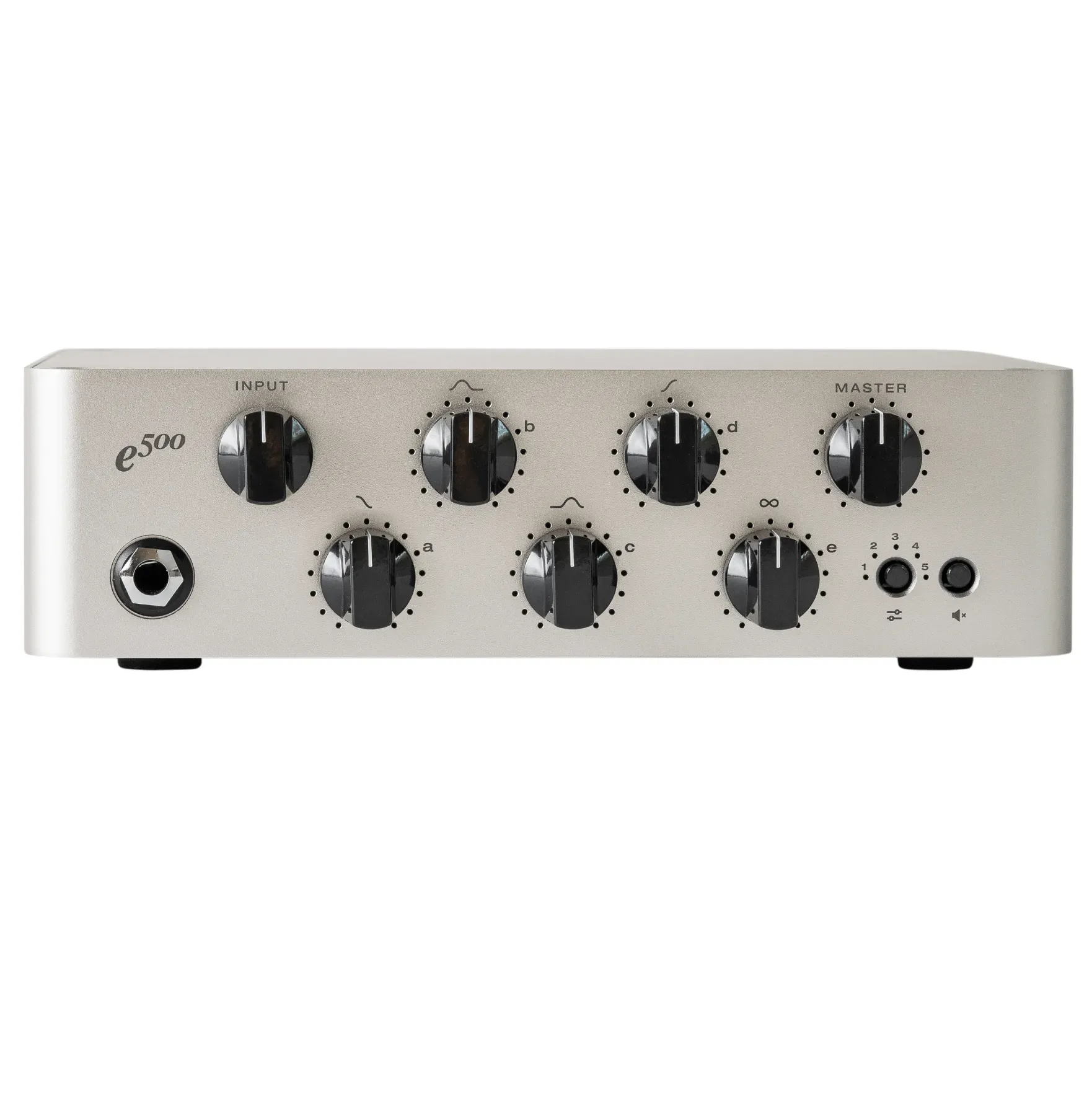
Input
Use this jack to connect your instrument via a standard ¼” mono cable.
Quick-Pots
There are five Quick-Pots on Exponent⁵⁰⁰’s front panel (A, B, C, D and E) .
By default, these pots are mapped to the Amp EQ’s four frequency bands and a preset-specific control.
In the Darkglass Suite, you can freely bind the Quick-Pots to your selection of any five controls from the effects in your signal chain.
Master
Use this knob to control the overall volume of the amplifier.
Preset
Pressing the preset button changes through presets 1 to 5 and a bypass signal. The current preset is shown with a single LED next to the preset number.
When Exponent⁵⁰⁰ is bypassed, all preset LEDs show a dim white color.
Long-press the preset button to start Bluetooth pairing. All preset LEDs will breathe white while pairing is active.
Mute
Pressing the mute button toggles mute on the physical outputs.
When Exponent⁵⁰⁰ is muted, all preset LEDs will illuminate with a dim red color.
Dimensions
Width: 21 cm / 8,3″
Length: 17.5 cm / 6,9″
Height: 6 cm / 2,4″
Weight: 1,65 kg / 3,64 lb
We always craved a clean head. A device that is “out of the box” is an amplifier without added effects. Uncomplicated, intuitive, and for each one of us to be able to unveil the layer of sophistication that better serves our projects and skills. The Exponent 500 is a new concept that once connected turns into a multi-effect, with fully programmable and presettable signal chains with all the components a professional bassist requires.
Brand new, boxed, full warranty, as new.
Recensisci per primo “Darkglass Exponent 500 – Ex Show”
Prodotti correlati


Amplification


Amplification


Amplification

Amplification
Amplification


1-Previous Stock


1-Previous Stock


Amplification
Recensioni
Ancora non ci sono recensioni.